- Single Sign-On (SSO) integration with providers like Okta
- Granular role-based access controls with MFA support
- Session recording for compliance
- Automatic cluster discovery (for EKS)
Requirements
To connect to a Kubernetes cluster through the Connector, you need the following:- The Formal Endpoint running and authenticated. You can find more information on how to achieve this in the documentation of the Formal Endpoint.
- At least one Kubernetes cluster linked to the Formal Connector as a Resource, with its Native User set. For AWS EKS clusters, set the Resource name to the cluster name.
Configuration
Resource
When creating a Kubernetes resource, use the Kubernetes API endpoint URL with port 443 as the target port. The Connector uses the resource name to identify which cluster to target when a user tries to access a cluster. How the Connector finds the upstream cluster depends on the Native User:- AWS IAM and AWS IAM Role look up the EKS cluster by the Resource name.
- Kubeconfig and Kubeconfig Path select the kubeconfig context whose cluster
serverURL matches the Resource hostname and port. Context names are ignored, and exactly one context must match. - Azure IAM and GCP IAM connect to the Resource hostname and port directly.
Native Users
The Connector supports the following Native User credential types for Kubernetes:- AWS IAM uses the Connector’s ambient AWS identity.
- AWS IAM Role assumes the specified AWS role ARN.
- Azure IAM uses the Connector’s ambient Microsoft Entra identity.
- GCP IAM uses the Connector’s ambient Google identity.
- Kubeconfig Path reads a kubeconfig file from the Connector.
- Kubeconfig uses an inline kubeconfig YAML document.
Terraform
For Kubernetes-specific credentials, configure one of the following Native Users. Kubeconfig paths and documents can be literal values or references to environment variables available to the Connector.Kubeconfig Path
Kubeconfig
AWS IAM permissions
When using AWS IAM or AWS IAM Role, the Connector needs the following AWS permissions to fetch the upstream cluster configuration:- Create an IAM role trusted by
pods.eks.amazonaws.com - Attach the AWS IAM policy above to that role
- Associate the role with the Connector service account via EKS Pod Identity
- Use that service account on the Connector pod
Upstream Kubernetes permissions
When connected to the target Kubernetes cluster, the Connector inherits the permissions defined by its token’s username and groups (e.g. the matching ClusterRoleBinding and ClusterRole). If the credentials have limited permissions, the Formal app will show the access logs correctly but users will see errors when attemptingkubectl commands. For example:
kubectl commands according to the Connector identity on the Kubernetes cluster. For example, for a ClusterRole that allows reading pods but not nodes:
Upstream Kubernetes permissions (AWS EKS)
If your target Kubernetes resource is an AWS EKS cluster, you need to:- Allow your Connector role to connect to the EKS cluster with an Access Entry Configuration
- Define its permissions with an Access Entry Policy Association that links your previously created Pod Identity IAM role with the cluster access policy of your choice (e.g.
arn:aws:eks::aws:cluster-access-policy/AmazonEKSViewPolicy).
Example Terraform deployment
For a complete example of deploying the Formal Connector in an EKS cluster that controls access to that cluster, see our example Terraform configuration. This example demonstrates:- Deploying the Formal Connector on AWS EKS
- Setting up AWS IAM roles and policies for EKS API access
- Configuring the Kubernetes cluster access permissions for the Connector
Impersonation
User impersonation provides two key benefits:- Improved audit logs: Actions in Kubernetes logs are attributed to individual users rather than showing all Formal-mediated actions under a single service account.
- Granular access control: Users’ permissions are restricted to match what they would have when connecting directly to the cluster.
Kubernetes RBAC
To allow user impersonation, the target Kubernetes cluster must have a specific RBAC configuration and allow theimpersonate verb.
While the cluster-admin role includes impersonation permissions by default, custom roles require explicit configuration. Here is an example ClusterRole and ClusterRoleBinding that will allow a Connector to impersonate end users:
- ClusterRole
- ClusterRoleBinding
ClusterRole
Formal policy
The Connector decides whether to impersonate users based on policies. This policy will grant the calling user access to resources defined by the groups ininput.user.groups rather than the access level defined by the native user.
Impersonate-User: The user specified in the policy under user.Impersonate-Group: The list of groups in the policy under groups. If using RBAC, it should match the groups used in your Kubernetes cluster.
Policy Evaluation
Formal supports the following policy evaluation stages for Kubernetes:- Session: Evaluate and enforce policies on every Kubernetes API request.
input.kubernetesdescribes that request.
Kubernetes Input
The Connector populates theinput.kubernetes object for policy evaluation. See the full reference in Policy Evaluation.
Other policies
Additionally, you can apply access restrictions to Kubernetes Resources, similar to any other Resource. This includes the implementation of two additional filters, among others:- Kind: allow or block access to a specific Kubernetes Kind (e.g. secret)
- Namespace: allow or block access to a specific Kubernetes Namespace
MFA for kubectl exec
This policy requires users to use MFA to run kubectl exec.
Block kube-* namespaces
The following policy blocks every query to the Connector for namespaces that start with kube-.
Recordings
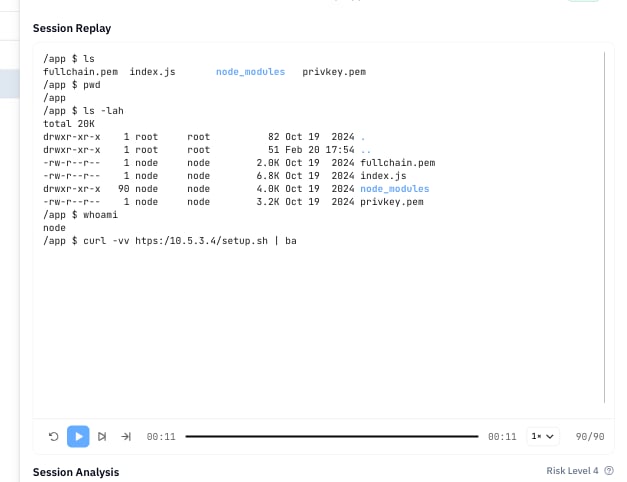
The Formal Connector recordskubectl exec and kubectl attach sessions. Other requests, including kubectl port-forward, are logged but not recorded. The session recordings can be accessed and reviewed in the Sessions application.