> ## Documentation Index
> Fetch the complete documentation index at: https://docs.formal.ai/llms.txt
> Use this file to discover all available pages before exploring further.
# AWS S3
> How to connect to an AWS S3 Resource using the Formal Connector
## Overview
The Formal Connector operates by reverse-proxying the S3 API, effectively serving as an intermediary that forwards requests to S3. By reverse-proxying all buckets that the configured IAM role has access to, it enables precise control over bucket access and operations. Users can specify the target bucket when using the AWS S3 CLI/API, ensuring that access is streamlined and secure.
## Creating an S3 resource
Using the S3 Connector requires a hostname to be configured. See [Hostname and TLS Configuration](/docs/guides/core-concepts/connectors/tls) for more details.
In Formal, S3 resources represent top-level S3 endpoints that are capable of handling a `ListBuckets` API call. For example, for AWS-hosted S3, you should use `s3.amazonaws.com` as your resource hostname. For Cloudflare R2, you should use `.r2.cloudflarestorage.com`.
## Authentication
The Connector verifies the caller's Formal credentials, then re-signs the request with its own AWS credentials before forwarding to S3. The caller's AWS SigV4 signature is **not** passed through to AWS.
As a result:
* The IAM role provided to the Connector must allow all S3 operations that a user may target.
* Bucket policies and IAM policies authorize the Connector's role, not the Formal user as an AWS principal.
### Per-user AWS session attribution
Before signing, the Connector calls `sts:AssumeRole` on its own role with a session name of `formal-session-`. AWS then sees each request as coming from an assumed-role session tied to that user. The session name surfaces wherever AWS reports the caller identity, including:
* CloudTrail (`userIdentity.arn` and `userIdentity.sessionContext`)
* S3 server access logs
For this to work, the Connector's role trust policy must allow the role to assume itself:
```json theme={null}
{
"Version": "2012-10-17",
"Statement": [
{
"Effect": "Allow",
"Principal": { "AWS": "arn:aws:iam:::role/" },
"Action": "sts:AssumeRole"
}
]
}
```
If the self-assume fails, the Connector falls back to its base credentials and the per-user session name is lost. Requests still succeed, but AWS sees every user as the Connector's role.
The session name also surfaces in IAM and bucket policy conditions, enabling per-end-user rules directly in AWS in addition to the Formal policy engine. `sts:RoleSessionName` matches the session name directly. For assumed-role sessions, `aws:userid` has the composite format `:`, not just the session name.
AWS enforces a 64-character limit on `RoleSessionName`. With the `formal-session-` prefix (15 characters), only 49 characters remain for the user email.
## Autodiscovery of S3 buckets
The Formal Control Plane can autodiscover S3 buckets in your AWS account. Please see [Cloud Integrations](/docs/guides/integrations/clouds) to enable autodiscovery for a given account.
## Connecting to S3 via the Connector
### Using the AWS CLI
To connect to S3 via the Connector, you should use your Formal Credentials as your AWS Credentials and modify the endpoint url to the Connector hostname as follows:
```
export AWS_ACCESS_KEY_ID=""
export AWS_SECRET_ACCESS_KEY=""
aws s3 --endpoint-url ls
```
### Using the Formal Desktop App
The Formal desktop app streamlines S3 access by seamlessly routing S3 CLI commands to the connectors that can best access the requested AWS account and bucket. This feature requires S3 bucket autodiscovery to be enabled for all AWS accounts that host buckets that users might access via the desktop app. Examples of commands via the desktop app are below.
```bash theme={null}
# ListBuckets
formal s3 --account-name dev ls
formal s3api --account-id 123456789012 list-buckets
# ListObjectsV2, GetObject, all other bucket-level operations
formal s3 ls s3://my-bucket
formal s3api list-objects-v2 --bucket-name my-bucket
```
### Using the Formal S3 Browser
The Formal S3 Browser is a web interface embedded in the connector that allows you to browse, upload, and download files from your S3 buckets.
To use the S3 Browser, you can navigate to `https://:/formal-s3-browser` in your web browser. You will then be redirected to the Formal console which will automatically authenticate you to the connector and make the S3 Browser available to you.
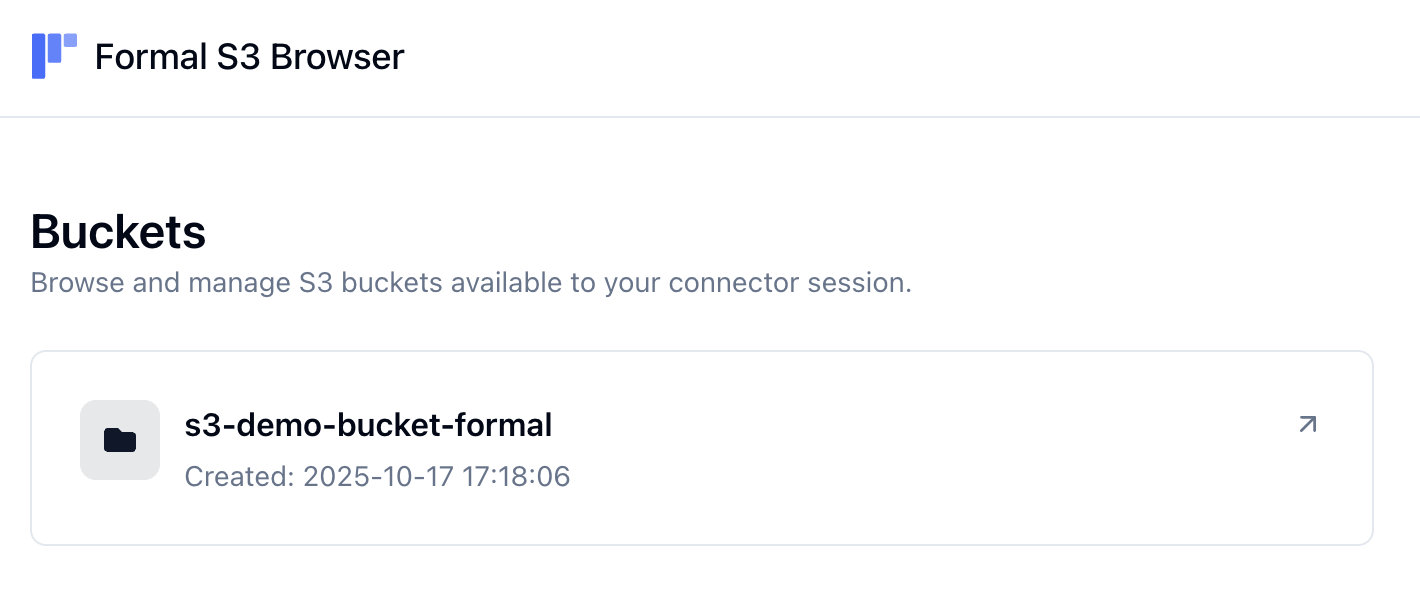
After logging in, you'll first be presented with a list of the S3 buckets accessible to your connector.
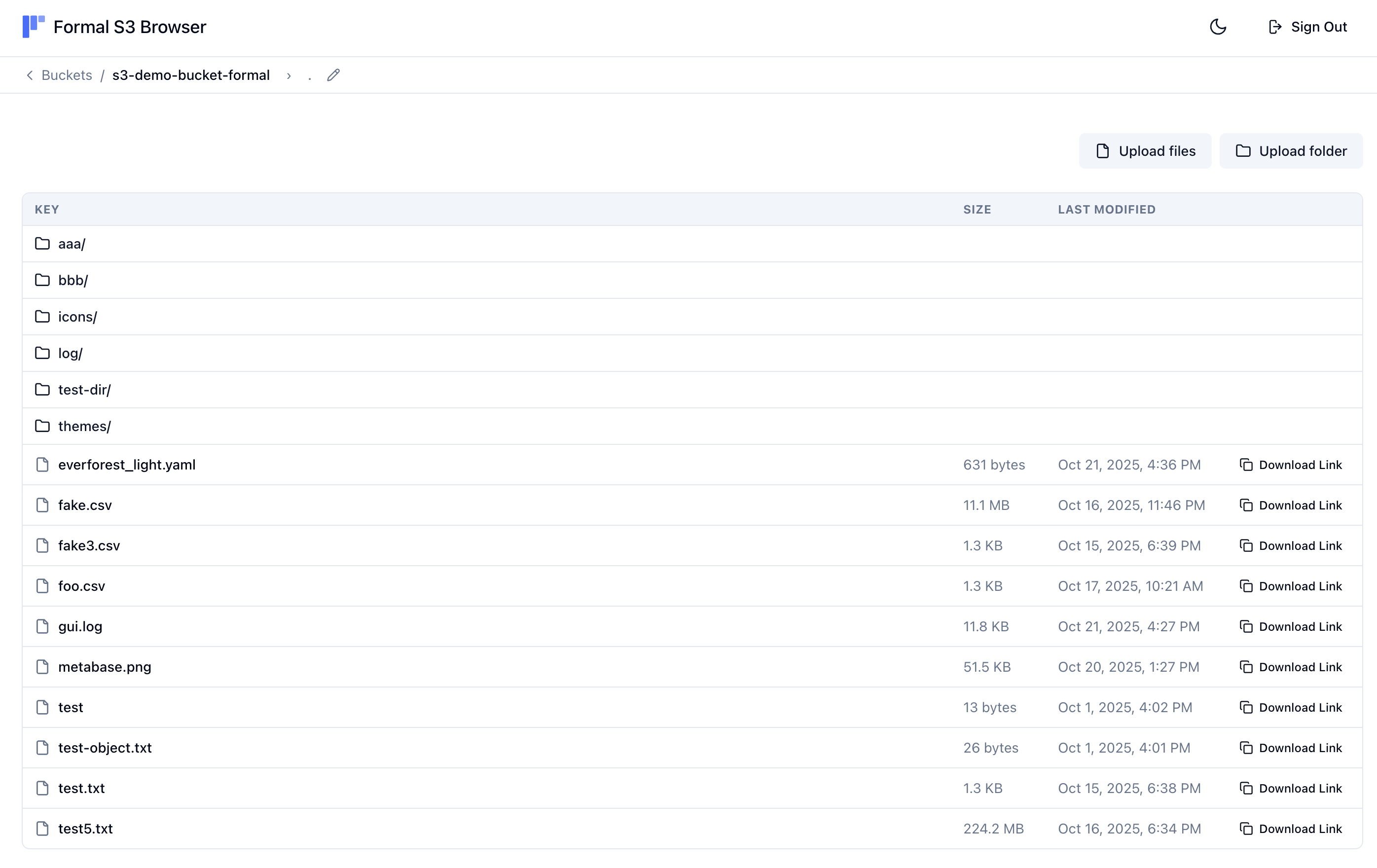
 Clicking on a bucket will reveal the files and folders within it. You can also browse the contents of a folder or upload new files or folders.
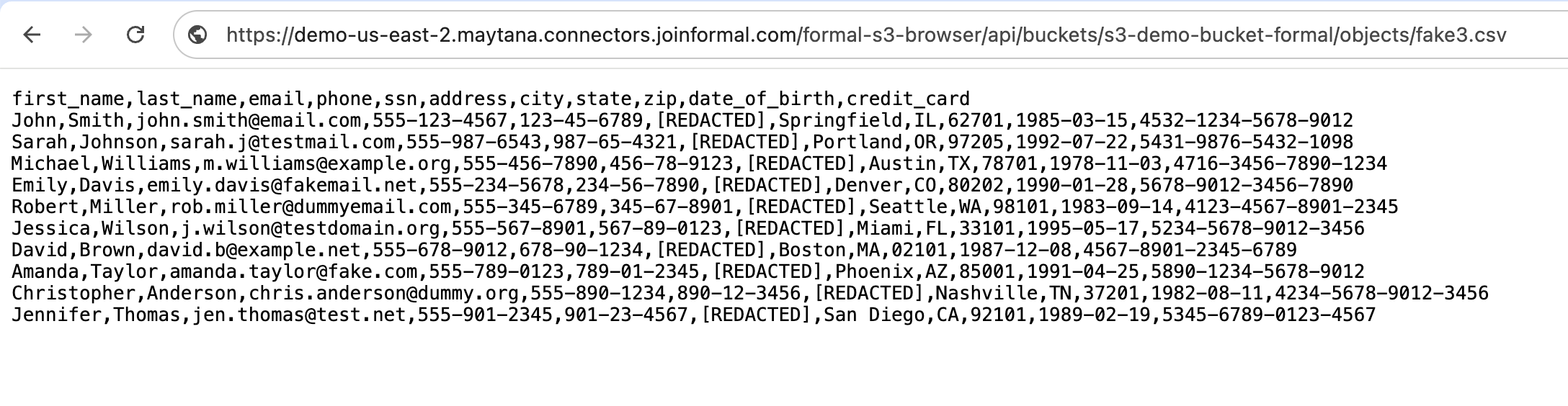
 S3 API traffic from the S3 Browser is proxied through the connector. This ensures that all accesses are logged to the Formal Control Plane and that all policies that apply to S3 API traffic are enforced.
For example, when a masking policy is applied to `GetObject` requests, the S3 Browser will also mask the contents of the file on download.
S3 API traffic from the S3 Browser is proxied through the connector. This ensures that all accesses are logged to the Formal Control Plane and that all policies that apply to S3 API traffic are enforced.
For example, when a masking policy is applied to `GetObject` requests, the S3 Browser will also mask the contents of the file on download.
 ### End-user identity propagation
The S3 connector supports end-user identity propagation for internal applications and BI tools. For S3, the connector relies on the HTTP header `X-Formal-End-User-Identity` to identify the end user by their email. Examples of configuring this for the AWS SDK for various languages are below.
```go enduser.go theme={null}
package main
import (
"context"
"fmt"
"log"
"net/http"
"github.com/aws/aws-sdk-go-v2/aws"
"github.com/aws/aws-sdk-go-v2/config"
"github.com/aws/aws-sdk-go-v2/credentials"
"github.com/aws/aws-sdk-go-v2/service/s3"
)
type customTransport struct {
base http.RoundTripper
}
func (t *customTransport) RoundTrip(req *http.Request) (*http.Response, error) {
req.Header.Set("X-Formal-End-User-Identity", "example@example.com")
return t.base.RoundTrip(req)
}
func main() {
cfg, err := config.LoadDefaultConfig(context.TODO(),
config.WithCredentialsProvider(credentials.NewStaticCredentialsProvider("idp:formal:machine:example", "MACHINE_USER_ACCESS_TOKEN", "")),
config.WithBaseEndpoint("https://demo-env-starter.maytana.connectors.joinformal.com"),
config.WithHTTPClient(&http.Client{
Transport: &customTransport{
base: http.DefaultTransport,
},
}),
)
if err != nil {
log.Fatalf("unable to load SDK config, %v", err)
}
client := s3.NewFromConfig(cfg)
output, err := client.GetObject(context.TODO(), &s3.GetObjectInput{
Bucket: aws.String("s3-demo-bucket-formal"),
Key: aws.String("file.txt"),
})
if err != nil {
log.Fatalf("failed to get object, %v", err)
}
fmt.Printf("output: %v", output)
}
```
```python enduser.py theme={null}
import boto3
import sys
def main():
s3_client = boto3.client(
's3',
aws_access_key_id='idp:formal:machine:example',
aws_secret_access_key='MACHINE_USER_ACCESS_TOKEN',
endpoint_url='https://demo-env-starter.maytana.connectors.joinformal.com',
region_name='us-east-1'
)
def add_custom_headers(request, **kwargs):
request.headers['X-Formal-End-User-Identity'] = 'example@example.com'
s3_client.meta.events.register('before-sign.s3.*', add_custom_headers)
try:
response = s3_client.get_object(
Bucket='s3-demo-bucket-formal',
Key='file.txt'
)
print(f"output: {response}")
except Exception as e:
print(f"failed to get object: {e}")
return 1
if __name__ == "__main__":
sys.exit(main())
```
```javascript enduser.js theme={null}
import { S3Client, GetObjectCommand } from "@aws-sdk/client-s3";
const client = new S3Client({
credentials: {
accessKeyId: "idp:formal:machine:example",
secretAccessKey: "MACHINE_USER_ACCESS_TOKEN"
},
endpoint: "https://demo-env-starter.maytana.connectors.joinformal.com",
region: "us-east-1",
});
client.middlewareStack.add((next) => async (args) => {
args.request.headers["X-Formal-End-User-Identity"] = "example@example.com";
return next(args);
}, { step: "build", name: "addCustomHeaders" });
const response = await client.send(new GetObjectCommand({
Bucket: "s3-demo-bucket-formal",
Key: "file.txt"
}));
console.log(await response.Body.transformToString());
```
## Policy Evaluation
Formal supports the following policy evaluation stages for S3:
* **Session**: Evaluate and enforce policies at connection time
* **Request**: Evaluate and enforce policies before request execution
## Rate-limiting access to buckets
The Formal policy engine supports enforcing rate limits on accesses to S3 buckets based on access counts for a given user over the last minute or hour. An example of such a policy is below.
```rego theme={null}
package formal.v2
import future.keywords.if
request := { "action": "block", "type": "block_with_formal_message" } if {
input.bucket.name == "s3-demo-bucket-formal"
input.bucket.access_count.last_minute > 3
}
```
Note that rate limits are automatically shared across connector instances in high-availability deployments. The connector instances discover each other and synchronize rate limit counters to ensure accurate enforcement across the cluster. See [Clustering](/docs/guides/core-concepts/connectors/clustering) for configuration details.
### End-user identity propagation
The S3 connector supports end-user identity propagation for internal applications and BI tools. For S3, the connector relies on the HTTP header `X-Formal-End-User-Identity` to identify the end user by their email. Examples of configuring this for the AWS SDK for various languages are below.
```go enduser.go theme={null}
package main
import (
"context"
"fmt"
"log"
"net/http"
"github.com/aws/aws-sdk-go-v2/aws"
"github.com/aws/aws-sdk-go-v2/config"
"github.com/aws/aws-sdk-go-v2/credentials"
"github.com/aws/aws-sdk-go-v2/service/s3"
)
type customTransport struct {
base http.RoundTripper
}
func (t *customTransport) RoundTrip(req *http.Request) (*http.Response, error) {
req.Header.Set("X-Formal-End-User-Identity", "example@example.com")
return t.base.RoundTrip(req)
}
func main() {
cfg, err := config.LoadDefaultConfig(context.TODO(),
config.WithCredentialsProvider(credentials.NewStaticCredentialsProvider("idp:formal:machine:example", "MACHINE_USER_ACCESS_TOKEN", "")),
config.WithBaseEndpoint("https://demo-env-starter.maytana.connectors.joinformal.com"),
config.WithHTTPClient(&http.Client{
Transport: &customTransport{
base: http.DefaultTransport,
},
}),
)
if err != nil {
log.Fatalf("unable to load SDK config, %v", err)
}
client := s3.NewFromConfig(cfg)
output, err := client.GetObject(context.TODO(), &s3.GetObjectInput{
Bucket: aws.String("s3-demo-bucket-formal"),
Key: aws.String("file.txt"),
})
if err != nil {
log.Fatalf("failed to get object, %v", err)
}
fmt.Printf("output: %v", output)
}
```
```python enduser.py theme={null}
import boto3
import sys
def main():
s3_client = boto3.client(
's3',
aws_access_key_id='idp:formal:machine:example',
aws_secret_access_key='MACHINE_USER_ACCESS_TOKEN',
endpoint_url='https://demo-env-starter.maytana.connectors.joinformal.com',
region_name='us-east-1'
)
def add_custom_headers(request, **kwargs):
request.headers['X-Formal-End-User-Identity'] = 'example@example.com'
s3_client.meta.events.register('before-sign.s3.*', add_custom_headers)
try:
response = s3_client.get_object(
Bucket='s3-demo-bucket-formal',
Key='file.txt'
)
print(f"output: {response}")
except Exception as e:
print(f"failed to get object: {e}")
return 1
if __name__ == "__main__":
sys.exit(main())
```
```javascript enduser.js theme={null}
import { S3Client, GetObjectCommand } from "@aws-sdk/client-s3";
const client = new S3Client({
credentials: {
accessKeyId: "idp:formal:machine:example",
secretAccessKey: "MACHINE_USER_ACCESS_TOKEN"
},
endpoint: "https://demo-env-starter.maytana.connectors.joinformal.com",
region: "us-east-1",
});
client.middlewareStack.add((next) => async (args) => {
args.request.headers["X-Formal-End-User-Identity"] = "example@example.com";
return next(args);
}, { step: "build", name: "addCustomHeaders" });
const response = await client.send(new GetObjectCommand({
Bucket: "s3-demo-bucket-formal",
Key: "file.txt"
}));
console.log(await response.Body.transformToString());
```
## Policy Evaluation
Formal supports the following policy evaluation stages for S3:
* **Session**: Evaluate and enforce policies at connection time
* **Request**: Evaluate and enforce policies before request execution
## Rate-limiting access to buckets
The Formal policy engine supports enforcing rate limits on accesses to S3 buckets based on access counts for a given user over the last minute or hour. An example of such a policy is below.
```rego theme={null}
package formal.v2
import future.keywords.if
request := { "action": "block", "type": "block_with_formal_message" } if {
input.bucket.name == "s3-demo-bucket-formal"
input.bucket.access_count.last_minute > 3
}
```
Note that rate limits are automatically shared across connector instances in high-availability deployments. The connector instances discover each other and synchronize rate limit counters to ensure accurate enforcement across the cluster. See [Clustering](/docs/guides/core-concepts/connectors/clustering) for configuration details.