> ## Documentation Index
> Fetch the complete documentation index at: https://docs.formal.ai/llms.txt
> Use this file to discover all available pages before exploring further.
# Permissions
> How to configure user permissions for Formal applications (Control Plane)
This page covers **Control Plane permissions** - policies that control access
to Formal's web interface and APIs. For policies that control data access
through Connectors (like database query policies), see the
[Policies](/docs/guides/policies/introduction) section.
## Introduction
Formal's permission system is built on the [Open Policy Agent (OPA)](https://www.openpolicyagent.org/), allowing you to restrict user access to specific applications through Rego policies. By defining granular permissions, you can ensure users have access only to the applications necessary for their roles and responsibilities. These permissions are enforced against our [API endpoints](/docs/api/introduction).
## Default permissions
Upon account creation, Formal operates under an allow-by-default model. Meaning, by default, if no permission blocks an endpoint for a given user, then the endpoint is allowed.
## Permission Model
Unlike other software products, Formal does not have the traditional concept of Roles. Instead, users can leverage Permissions to create role based access control (RBAC) using your organization's Groups (which can be SCIM provisioned from your IDP into Formal).
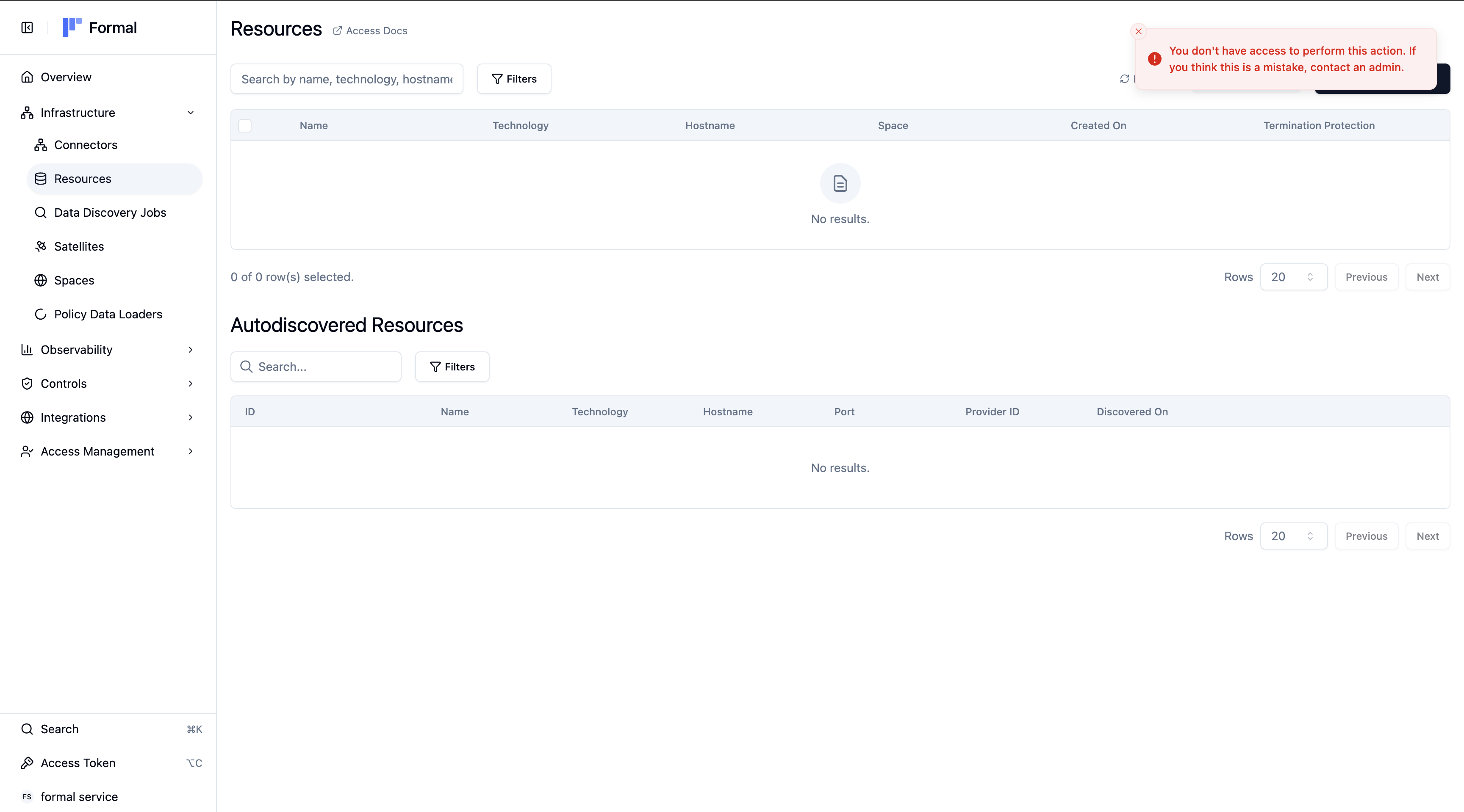
## User experience when blocked
The Formal APIs will return HTTP 403 error status codes if a user is blocked on a particular endpoint. Users who are interacting with the Formal APIs through the Formal console will experience "Forbidden" toasts or dialogs.
 ## List of inputs
You can block or allow requests based on the following user and application inputs:
### User inputs
* `input.user.id`
* `input.user.name`
* `input.user.email`
* `input.user.groups`
* `input.user.ip_address`
* `input.user.type` (i.e. `human` or `machine`)
* `input.user.aws_principal_arn` — full AWS principal ARN ([AWS SigV4 authentication](/docs/api/aws-sigv4-authentication) machine auth only)
* `input.user.aws_account_id` — AWS account ID ([AWS SigV4 authentication](/docs/api/aws-sigv4-authentication) machine auth only)
`input.user.aws_principal_arn` and `input.user.aws_account_id` are populated
only for requests authenticated with [AWS SigV4](/docs/api/aws-sigv4-authentication).
API key and SSO requests leave these fields empty.
### Application inputs
* `input.app.name`
* `input.app.command.name`
* `input.app.command.type`
The permissions system also supports blocking or allowing requests based on the request payload for any API call based on input arguments (`input.args`).
#### List of command types
Here is a table listing all command types that can be used. If the API call contains the operation, then it is categorized as the corresponding type.
| Type | Operations |
| ------ | ------------- |
| read | `Get`, `List` |
| create | `Create` |
| update | `Update` |
| delete | `Delete` |
| login | `Login` |
#### List of applications
API endpoints are segmented into **Applications.**
Here is a table listing all applications that can be configured for access permissions:
{/* Run: bun run scripts/generate-apps-table.ts */}
These applications have [public API endpoints](/api-reference) accessible via API keys or the web console.
| Name | Description |
| ---------------------------------------------------------------------- | ----------------------------------------------------------------- |
| [ChangeAuthorization](/api-reference/corev1changeauthorizationservice) | Manage change authorization workflows for infrastructure changes. |
| [Connector](/api-reference/corev1connectorservice) | Manage Connector proxy instances and listeners. |
| [Graph](/api-reference/corev1graphservice) | View Formal's data graph. |
| [Group](/api-reference/corev1groupservice) | Manage user groups for role-based access control. |
| [IntegrationBI](/api-reference/corev1integrationbiservice) | Manage BI tool integrations (Metabase, Looker, Fivetran). |
| [IntegrationCloud](/api-reference/corev1integrationcloudservice) | Manage cloud provider integrations (AWS, GCP, Azure). |
| [IntegrationMDM](/api-reference/corev1integrationmdmservice) | Manage Mobile Device Management integrations. |
| [IntegrationsLog](/api-reference/corev1integrationslogservice) | Manage log forwarding (Splunk, Datadog, S3). |
| [Inventory](/api-reference/corev1inventoryservice) | Manage discovered schemas, tables, and columns. |
| [Logs](/api-reference/corev1logsservice) | View and manage audit logs and retention settings. |
| [Permissions](/api-reference/corev1permissionsservice) | Manage OPA permissions for this API. |
| [Policies](/api-reference/corev1policiesservice) | Manage data access policies (masking, blocking, alerts). |
| [PolicyDataLoader](/api-reference/corev1policydataloaderservice) | Manage external data loaders for policy context. |
| [Resource](/api-reference/corev1resourceservice) | Manage datastores and APIs proxied by Formal. |
| [Satellite](/api-reference/corev1satelliteservice) | Manage Satellite deployments for data discovery. |
| [ScenarioMonitoring](/api-reference/corev1scenariomonitoringservice) | Manage real-time alerts and monitoring rules. |
| [Sessions](/api-reference/corev1sessionsservice) | View and replay user session recordings. |
| [Sidecar](/api-reference/corev1sidecarservice) | Legacy Connector management (use Connector instead). |
| [Space](/api-reference/corev1spaceservice) | Manage Spaces for organizing resources by team or project. |
| [User](/api-reference/corev1userservice) | Manage users, invitations, and account settings. |
| [Workflow](/api-reference/corev1workflowservice) | Manage automated workflows across Formal. |
These applications are only accessible through the Formal web console and do not have public API documentation.
For web console only applications, we recommend restricting access at the
application level rather than by individual command types, since the available
commands are not publicly documented.
| Name | Description |
| ------------- | -------------------------------------------------------- |
| Access | View and manage personal access tokens. |
| Agent | AI-powered conversational assistant for Formal. |
| DSPM | Manage DSPM jobs and tasks. |
| Dashboard | View dashboard home page statistics. |
| Desktop | Approve personal desktop app logins. |
| Developer | Manage developer API keys. |
| DirectorySync | Configure SCIM directory sync with identity providers. |
| Reports | Create and manage security reports and widgets. |
| Search | Search across resources, connectors, policies, and more. |
| Slack | Configure Slack notifications and alerts. |
| Sso | Configure SAML Single Sign-On. |
| Version | View latest connector and satellite versions. |
## Example: Single Application
Below is an example of a Rego policy that grants access to the Sessions application exclusively for users in the admin group.
```Rego theme={null}
package formal.app
import future.keywords.in
import future.keywords.if
default allow = false
allow := true if {
input.app.name == "Sessions"
"admin" in input.user.groups
}
```
This policy sets the default access to false, meaning no access is granted unless specified by a rule. The allow rule checks if the application requested is Sessions and if the user belongs to the admin group. If both conditions are met, access is granted.
## Example: Granular Access Control
```Rego theme={null}
package formal.app
import future.keywords.in
import future.keywords.if
default allow = false
# Allow read access to everyone
allow if {
input.app.command.type == "read"
}
# Allow everyone to get their own Credentials
allow if {
input.app.name == "Access"
}
# Allow full access if the user is a member of the security team
allow if {
"security-admins" in input.user.groups
}
# Allow engineers to access relevant applications
allow if {
input.app.name in ["Desktop"]
"engineers" in input.user.groups
}
```
This multi-rule policy demonstrates how to combine different access levels:
* **Broad read access**: Everyone can view most data using `read` command types.
* **Self-service access**: Everyone can manage their own credentials in the **Access** app.
* **Administrative access**: Users in `security-admins` have unrestricted access to all apps.
* **Team-specific access**: Users in the `engineers` group can access developer-focused tools.
Since `default allow = false` is set, any request that does not match at least one of these `allow` rules is blocked. Formal returns a 403 Forbidden error for these requests.
## Example: Argument-based Access Control
```Rego theme={null}
package formal.app
import future.keywords.if
default allow = true
allow := false if {
input.app.command.name == "UpdatePolicy"
input.args.id == "policy_01kg6rhpe7em4rr2v0mcwm0mp4"
not "security-admins" in input.user.groups
}
```
This policy blocks updates to the policy with the ID `policy_01kg6rhpe7em4rr2v0mcwm0mp4` unless the user is in the `security-admins` group.
## Example: AWS SigV4 machine access
Use `input.user.aws_principal_arn` and `input.user.aws_account_id` to scope
[AWS SigV4-authenticated](/docs/api/aws-sigv4-authentication) machine users by
AWS principal or account.
```Rego theme={null}
package formal.app
import future.keywords.if
default allow = false
allow if {
input.user.type == "machine"
input.user.aws_account_id == "123456789012"
startswith(input.user.aws_principal_arn, "arn:aws:iam::123456789012:role/formal-")
input.app.name == "Resource"
input.app.command.type == "read"
}
```
This policy allows read access to the **Resource** application only for machine
users authenticated from AWS account `123456789012` whose principal ARN starts
with `arn:aws:iam::123456789012:role/formal-`.
## List of inputs
You can block or allow requests based on the following user and application inputs:
### User inputs
* `input.user.id`
* `input.user.name`
* `input.user.email`
* `input.user.groups`
* `input.user.ip_address`
* `input.user.type` (i.e. `human` or `machine`)
* `input.user.aws_principal_arn` — full AWS principal ARN ([AWS SigV4 authentication](/docs/api/aws-sigv4-authentication) machine auth only)
* `input.user.aws_account_id` — AWS account ID ([AWS SigV4 authentication](/docs/api/aws-sigv4-authentication) machine auth only)
`input.user.aws_principal_arn` and `input.user.aws_account_id` are populated
only for requests authenticated with [AWS SigV4](/docs/api/aws-sigv4-authentication).
API key and SSO requests leave these fields empty.
### Application inputs
* `input.app.name`
* `input.app.command.name`
* `input.app.command.type`
The permissions system also supports blocking or allowing requests based on the request payload for any API call based on input arguments (`input.args`).
#### List of command types
Here is a table listing all command types that can be used. If the API call contains the operation, then it is categorized as the corresponding type.
| Type | Operations |
| ------ | ------------- |
| read | `Get`, `List` |
| create | `Create` |
| update | `Update` |
| delete | `Delete` |
| login | `Login` |
#### List of applications
API endpoints are segmented into **Applications.**
Here is a table listing all applications that can be configured for access permissions:
{/* Run: bun run scripts/generate-apps-table.ts */}
These applications have [public API endpoints](/api-reference) accessible via API keys or the web console.
| Name | Description |
| ---------------------------------------------------------------------- | ----------------------------------------------------------------- |
| [ChangeAuthorization](/api-reference/corev1changeauthorizationservice) | Manage change authorization workflows for infrastructure changes. |
| [Connector](/api-reference/corev1connectorservice) | Manage Connector proxy instances and listeners. |
| [Graph](/api-reference/corev1graphservice) | View Formal's data graph. |
| [Group](/api-reference/corev1groupservice) | Manage user groups for role-based access control. |
| [IntegrationBI](/api-reference/corev1integrationbiservice) | Manage BI tool integrations (Metabase, Looker, Fivetran). |
| [IntegrationCloud](/api-reference/corev1integrationcloudservice) | Manage cloud provider integrations (AWS, GCP, Azure). |
| [IntegrationMDM](/api-reference/corev1integrationmdmservice) | Manage Mobile Device Management integrations. |
| [IntegrationsLog](/api-reference/corev1integrationslogservice) | Manage log forwarding (Splunk, Datadog, S3). |
| [Inventory](/api-reference/corev1inventoryservice) | Manage discovered schemas, tables, and columns. |
| [Logs](/api-reference/corev1logsservice) | View and manage audit logs and retention settings. |
| [Permissions](/api-reference/corev1permissionsservice) | Manage OPA permissions for this API. |
| [Policies](/api-reference/corev1policiesservice) | Manage data access policies (masking, blocking, alerts). |
| [PolicyDataLoader](/api-reference/corev1policydataloaderservice) | Manage external data loaders for policy context. |
| [Resource](/api-reference/corev1resourceservice) | Manage datastores and APIs proxied by Formal. |
| [Satellite](/api-reference/corev1satelliteservice) | Manage Satellite deployments for data discovery. |
| [ScenarioMonitoring](/api-reference/corev1scenariomonitoringservice) | Manage real-time alerts and monitoring rules. |
| [Sessions](/api-reference/corev1sessionsservice) | View and replay user session recordings. |
| [Sidecar](/api-reference/corev1sidecarservice) | Legacy Connector management (use Connector instead). |
| [Space](/api-reference/corev1spaceservice) | Manage Spaces for organizing resources by team or project. |
| [User](/api-reference/corev1userservice) | Manage users, invitations, and account settings. |
| [Workflow](/api-reference/corev1workflowservice) | Manage automated workflows across Formal. |
These applications are only accessible through the Formal web console and do not have public API documentation.
For web console only applications, we recommend restricting access at the
application level rather than by individual command types, since the available
commands are not publicly documented.
| Name | Description |
| ------------- | -------------------------------------------------------- |
| Access | View and manage personal access tokens. |
| Agent | AI-powered conversational assistant for Formal. |
| DSPM | Manage DSPM jobs and tasks. |
| Dashboard | View dashboard home page statistics. |
| Desktop | Approve personal desktop app logins. |
| Developer | Manage developer API keys. |
| DirectorySync | Configure SCIM directory sync with identity providers. |
| Reports | Create and manage security reports and widgets. |
| Search | Search across resources, connectors, policies, and more. |
| Slack | Configure Slack notifications and alerts. |
| Sso | Configure SAML Single Sign-On. |
| Version | View latest connector and satellite versions. |
## Example: Single Application
Below is an example of a Rego policy that grants access to the Sessions application exclusively for users in the admin group.
```Rego theme={null}
package formal.app
import future.keywords.in
import future.keywords.if
default allow = false
allow := true if {
input.app.name == "Sessions"
"admin" in input.user.groups
}
```
This policy sets the default access to false, meaning no access is granted unless specified by a rule. The allow rule checks if the application requested is Sessions and if the user belongs to the admin group. If both conditions are met, access is granted.
## Example: Granular Access Control
```Rego theme={null}
package formal.app
import future.keywords.in
import future.keywords.if
default allow = false
# Allow read access to everyone
allow if {
input.app.command.type == "read"
}
# Allow everyone to get their own Credentials
allow if {
input.app.name == "Access"
}
# Allow full access if the user is a member of the security team
allow if {
"security-admins" in input.user.groups
}
# Allow engineers to access relevant applications
allow if {
input.app.name in ["Desktop"]
"engineers" in input.user.groups
}
```
This multi-rule policy demonstrates how to combine different access levels:
* **Broad read access**: Everyone can view most data using `read` command types.
* **Self-service access**: Everyone can manage their own credentials in the **Access** app.
* **Administrative access**: Users in `security-admins` have unrestricted access to all apps.
* **Team-specific access**: Users in the `engineers` group can access developer-focused tools.
Since `default allow = false` is set, any request that does not match at least one of these `allow` rules is blocked. Formal returns a 403 Forbidden error for these requests.
## Example: Argument-based Access Control
```Rego theme={null}
package formal.app
import future.keywords.if
default allow = true
allow := false if {
input.app.command.name == "UpdatePolicy"
input.args.id == "policy_01kg6rhpe7em4rr2v0mcwm0mp4"
not "security-admins" in input.user.groups
}
```
This policy blocks updates to the policy with the ID `policy_01kg6rhpe7em4rr2v0mcwm0mp4` unless the user is in the `security-admins` group.
## Example: AWS SigV4 machine access
Use `input.user.aws_principal_arn` and `input.user.aws_account_id` to scope
[AWS SigV4-authenticated](/docs/api/aws-sigv4-authentication) machine users by
AWS principal or account.
```Rego theme={null}
package formal.app
import future.keywords.if
default allow = false
allow if {
input.user.type == "machine"
input.user.aws_account_id == "123456789012"
startswith(input.user.aws_principal_arn, "arn:aws:iam::123456789012:role/formal-")
input.app.name == "Resource"
input.app.command.type == "read"
}
```
This policy allows read access to the **Resource** application only for machine
users authenticated from AWS account `123456789012` whose principal ARN starts
with `arn:aws:iam::123456789012:role/formal-`.